










In this 7-part series, we will answer all of your questions about Customer Groups in Magento 2 and break down everything you need to know to create and configure customer groups on your Magento 2 store.
Customer groups allow you to set a variety of different parameters per group. This is part five out of seven, we will be learning how to assign tax rules to a customer group.
New to this series? Be sure to check out:
- Magento 2 - Customer Group Basics
- Magento 2 – Changing the Default Customer Group Settings
- Creating New Customer Groups in Magento 2
- Adding Customers to a Customer Group in Magento 2
Assigning Tax Rules to a Customer Group in Magento 2
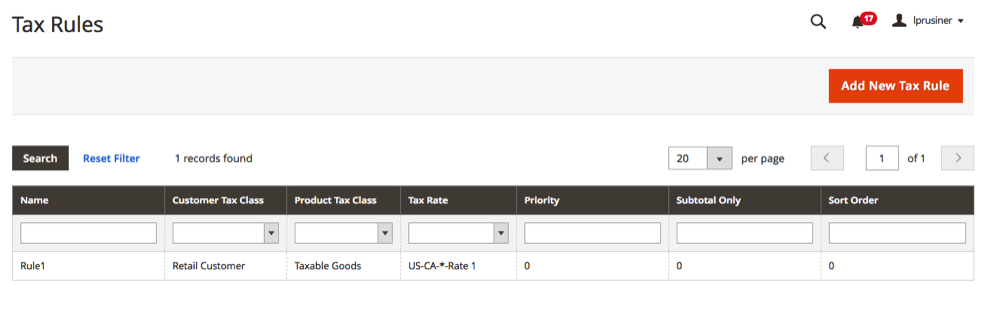
Magento 2 requires you select a tax class per customer group. To assign tax classes, navigate to Stores > Taxes > Tax Rules. This will bring up a table with all of your currently existing tax rules. Select which tax rule you would like to add the customer group to, or click Add New Tax Rule to create a new tax rule.
Regardless of if you are adding to an existing tax rule or creating a new one, you will expand the Additional Settings tab on the Tax Rule page and add your customer group under the Customer Tax Class field.
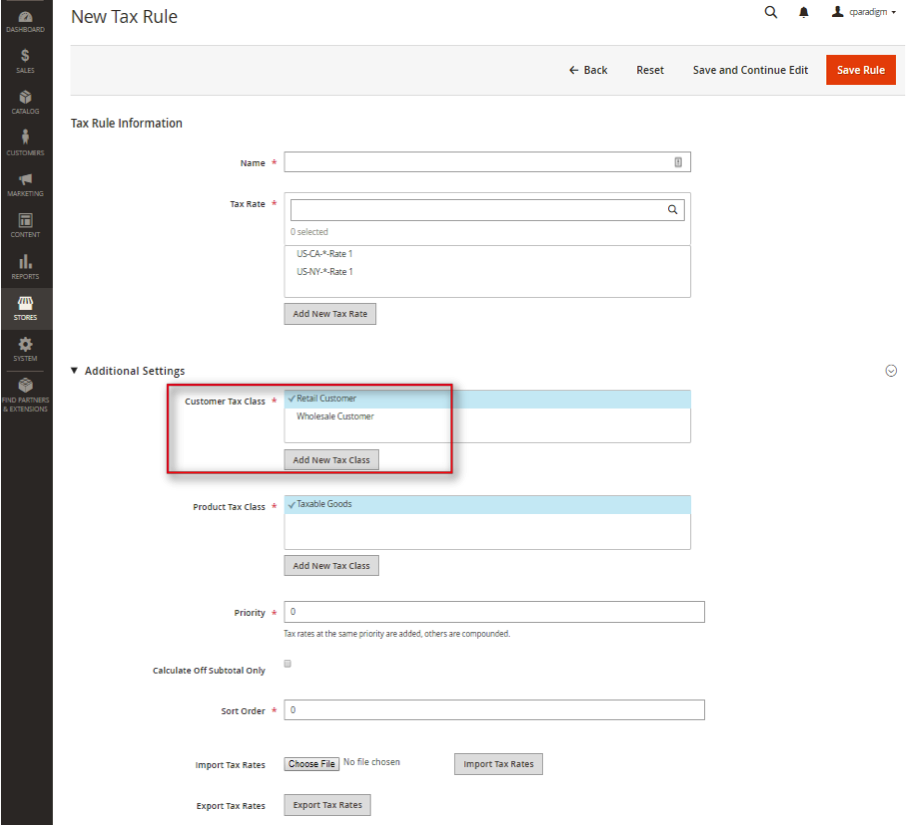
Be sure to click Save Rule when you have completed your selection.
Closing Thoughts
You should now have an understanding of how to set tax rules for a customer group in Magento 2.
More questions about customer groups? Tune into the rest of the series where we cover:
- Magento 2 - Customer Group Basics
- Magento 2 – Changing the Default Customer Group Settings
- Creating New Customer Groups in Magento 2
- Adding Customers to a Customer Group in Magento 2
- Assigning Promotional Rules to a Customer Group in Magento 2
- Setting Group Specific Pricing to a Customer Group in Magento 2
Are you enjoying this series on creating and configuring customer groups? Let us know your ideas for how to use customer groups on your Magento 2 store! Connect with us on Facebook or Twitter to let us know if there are any questions you have about customer groups that we didn’t answer for you.
Need help configuring, optimizing and maintaining your Magento 2 website? Connect with a member of our strategy team today and start reaching your eCommerce goals.