










In this 7-part series, we will answer all of your questions about Customer Groups in Magento 2 and break down everything you need to know to create and configure customer groups on your Magento 2 store.
Customer groups allow you to set a variety of different parameters per group. This is section seven out of seven in which we will be learning how to set product pricing for a specific customer group.
New to this series? Be sure to check out:
- Magento 2 - Customer Group Basics
- Magento 2 – Changing the Default Customer Group Settings
- Creating New Customer Groups in Magento 2
- Adding Customers to a Customer Group in Magento 2
- Assigning Tax Rules to a Customer Group in Magento 2
- Assigning Promotional Rules to a Customer Group in Magento 2
Setting Product Pricing:
Magento 2 also allows for group-specific pricing, per product. (This could be used for tier pricing for wholesale customers). This can be set when you are creating your products, or you can go back and edit an already existing product.
When creating a new product or editing an existing product, click on Advanced Pricing under the Price field:

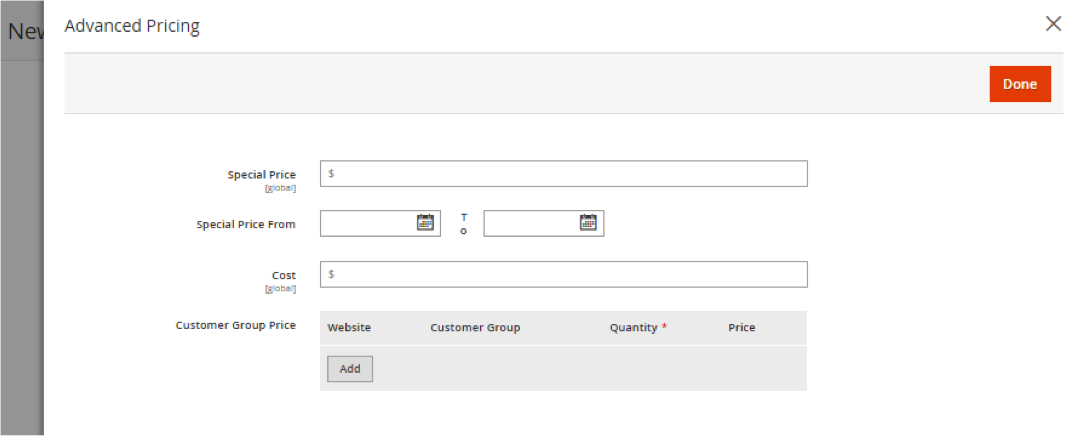
An advanced pricing tab will open, allowing you to add tier and group-specific pricing:
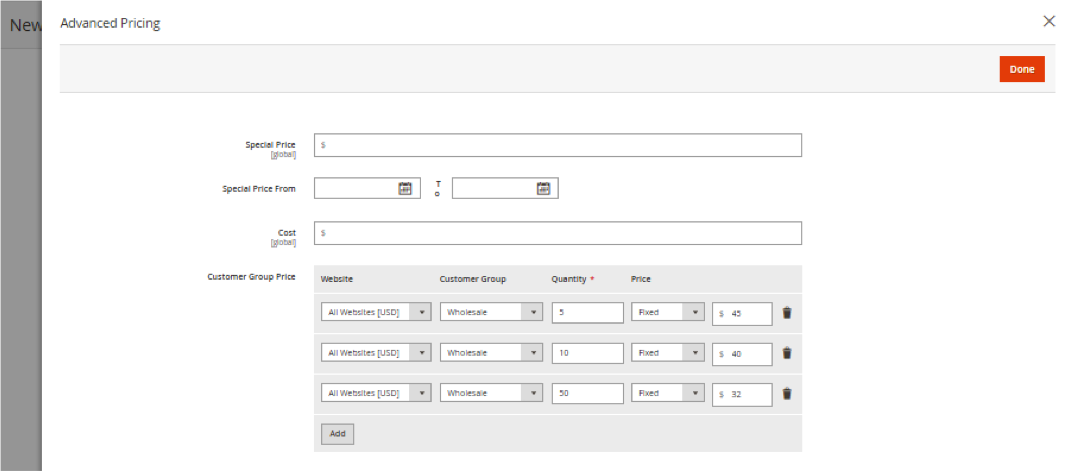
Remember - if you set up tier pricing, the price has to be lower than the actual product’s price as it refers to the one unit. (i.e. If you buy 5 products, each will cost $45 rather than 1 product at $50):
To test that your pricing rule is working for a specific customer group you can create a test customer account, add that customer account to the customer group that you want to test and then log in from your front-end with that account to see the changes in pricing for that customer group.
Closing Thoughts
You should now have an understanding of how to set specific pricing rules for customer groups in Magento 2. If you missed the other questions we answered about customer groups be sure to check out the rest of the series!
More questions about customer groups? Tune into the rest of the series where we cover:
- Magento 2 - Customer Group Basics
- Magento 2 – Changing the Default Customer Group Settings
- Creating New Customer Groups in Magento 2
- Adding Customers to a Customer Group in Magento 2
- Assigning Tax Rules to a Customer Group in Magento 2
- Assigning Promotional Rules to a Customer Group in Magento 2
Are you enjoying this series on creating and configuring customer groups? Let us know your ideas for how to use customer groups on your Magento 2 store! Connect with us on Facebook or Twitter to let us know if there are any questions you have about customer groups that we didn’t answer for you.
Need help configuring, optimizing and maintaining your Magento 2 website? Connect with a member of our strategy team today and start reaching your eCommerce goals.