









 Customer Paradigm Review
Reviewed by Stephanie K. on
Sep. 12, 2014.
Summary:
“Alisa and her team was very patient and persistent throughout the process. This project took a lot longer than expected and we truly appreciate her dedication. I can’t thank her enough as always!”
Type of Project: Magento Enterprise – SAP Order Import
Budgeted Hours: 7
Site: Amore Pacific
Reviewed:
Review of Customer Paradigm in Boulder, Colorado
Rating:
5.0
Screenshot of Website Reviewing Customer Paradigm’s Services:

View Larger Screenshot – Review of Customer Paradigm by Amore Pacific
Read More Customer Paradigm Reviews:
Customer Paradigm Review
Reviewed by Allen Borenstein on Jan 21, 2016.
Summary:
“I want to tell you that I am extremely pleased with the work that your company did on my website. Your people were always very knowledgeable and professional and they were very patient in dealing with me – since this was my first experience in working with a website. It has been a long road getting to the publishing of my book and of all the companies I have dealt with on the journey – your’s was the most enjoyable to work with. I always felt like I could get my questions answered promptly and I would highly recommend your company to anyone that is looking for your type of service.”
Type of Project: WordPress Design & Development. View More >>
Budgeted Hours: 25
Site: Coffee Can Baking
Reviewed:
Review of Customer Paradigm in Boulder, Colorado
Rating: 5.0
Screenshot of Website Reviewing Customer Paradigm’s Services:

View Larger Screenshot – Review of Customer Paradigm by Coffee Can Baking
Read More Customer Paradigm Reviews:
Commonly Asked Questions #3: How Many Products Can Magento Handle?
Commonly Asked Question: How many products (SKUs) can Magento handle?
One of the first questions business owners ask when trying to determine if the Magento platform is right for them is “How many products can I put on my Magento store?”
One of the biggest projects we have worked on here at Customer Paradigm had 250,000 – 300,000 products. The creation of Magento stores with vast catalogs is possible.
At the base technical level, Magento does not impose any product limits. Theoretically, Magento can handle millions of SKUs. From a practical standpoint, out of the box, Magento is not well optimized to handle large catalogs with massive amounts of SKUs.
Words to Know
SKU – “Stock Keeping Unit” is a number or code assigned to a product to identify the product, options, price, and manufacturer. A SKU is used to help you keep track of your products. Each product must have a unique SKU. SKUs are the same across all of your stores. SKUs can not repeat.
Indexing & Reindexing – Indexing is how Magento transforms data such as products and categories (etc.) to improve your websites performance. As the data changes, the modified data must be updated (reindexed). Without indexing, Magento would have to calculate everything (i.e. every price of every product – taking into account all rules, bundles, etc.in order to) on the fly, causing very long loading times.
Cache & Caching – “Caching” your website stores a full output of your page so that subsequent page loads do not require a lot of work from the server – thus speeding up loading times. Caching helps your store perform better when there is a lot of content in it.
Site Performance, Site Complexity, and Site Resources
One of the biggest areas of concern in creating a Magento site with a lot of SKUs is going to be your site performance. The more complex your site becomes, the more resources it will require maintaining an appropriate level of site performance.
In Magento, adding products is not a “one and done” task. For each product you add, you also have to add an image, a category, attributes, give it a SKU and more. Each of these tasks, multiplied by the amount of products your site has, adds to the complexity of your site.
You also have to consider:
- Number of websites and stores
- Number of categories
- Amount of custom code
- Number of extensions
- Theming
- Your server architecture and software
- Caching
The more complex your site is, the more draining it is on your sites performance. The more complex your site is, the slower your site will become. We know that speed matters. Pages with more than a 3 second load time can lose up to 40% of customers.
Key idea: The more products that have been added to your site, the more complicated it becomes, the larger your server resources need to be to maintain a usable speed.

On the backend, uploading products, URL rewrites, inventory reindexing and flushing the cache (which you will need to do after each bulk procedure) will take you significant amounts of time and server resources.
Each time you make a change to your site, or a visitor accesses your site, a request is sent to the server. On a larger site, more requests are sent to the server. Large sites will have far greater hosting demands. As such they will need to choose a top tier host that has a specific type of hosting environment.
All of this top shelf hosting comes at a top shelf price and will be a large up front investment into the infrastructure of your website.
Management of Large Catalogs
When working with large catalogs of products on Magento, it is important to consider upkeep. If you have 300,000 SKUs and 10% of them need to be updated weekly – that is 30,000 SKUs you have to manage on a weekly basis.
Stores of this size require significant staff time to maintain. All staff must be trained to use the backend Magento interface if they are “non-tech” admin. You or your staff will need to know how to upload and edit products, re-index and flushing the cache after all bulk procedures.

Once your store has been set into motion, it will require infrastructure to stay in motion.
Admin support will be needed to get going and stay going for stores of any size. However, the larger your store, the more administrative upkeep you will have. You need to be able to maintain the level of staff for the amount of products you want to have on your website.
Community vs. Enterprise
If you are planning to have a significant number of products in your Magento store, the Magento platform you are running is also something to take into account. While the Magento Community platform can do a wide variety of things, the out of the box functionality is not as diverse as the Magento Enterprise platform. (Customer Paradigm Founder Jeff Finkelstein talks about the pros and cons of each system at length!)
If you have already invested the money into server and staff infrastructure, it is recommended to use the Magento Enterprise Platform for larger stores for the following reasons:
- Better at handling indexing
- Better search functionality
- Better at handling data flow
- 80% faster in re-indexing a catalog
- Full page caching
Real World Case Study
Currently, Customer Paradigm is working with a client who has 26,000 products. While this is nowhere near our largest project of 300,000 products, it is still an amount that the client is already seeing a pain point at. Customer Paradigm Project Manager Darin has the inside scoop on this project.
When we began working with this client, they had all of their SKUs in one category, which has a negative effect on the front end user experience, conversion rates, and SEO ranking.
With all of the products in one lump category, there was no way for users to easily search the site to find the products they were looking to buy. With no sense of organization for their products, there was no way to easily break down the shopping experience for their customers. If customers cannot navigate through your expansive catalog, then you won’t be able to sell your products.

Your Magento store should be like a well-organized desk – a place for everything and everything in its place.
Darin’s challenge in working with this large number of unorganized SKUs is threefold. First, he needs to collaborate with the client to define and create a series of categories and subcategories for the SKUs, then find a streamlined way to assign all of the SKUs to a subcategory as well as enter all missing Metadata for SKUs and categories. The overarching problem is that all of the options for achieving these goals after the fact are incredibly tedious.
While some aspects of this project are evident – such as:
- The need for an easy to use layered navigation menu
- Utilization of search-friendly URLs (every URL needs to be unique and optimized for the page’s primary keyword)
- The implementation of Meta descriptions on category and product pages
The actual assignment of categories to the existing SKUs is a little trickier; there are three main options for doing this:
1. Manually assigning each SKU to a category – essentially going one by one. This option will be the lengthiest depending on how many existing SKUs you already have.
2. Exporting/Importing through a .CSV file – with this option you will export all SKUs to a spreadsheet, and from there update each SKU in the spreadsheet. Each Category will have an ID; you will have to find the corresponding ID and enter it for each SKU. The pitfalls of this method are that you have to ensure 100% accuracy for successful upload, and Magento only lets you upload about 1,500 products at a time.
3. Utilization of an extension – there several extensions on the marketplace that attempt to make bulk processes simpler
Darin is positive that once the new site structure has is in place that managing this large number of products will get easier for the client, as long as they continue to follow the systems put in place. However, he notes, that it is important to think about site structure before the initial creation of your site!
Do you need help with your Magento site – big or small? Our expert team can help you set your Magento eCommerce website up for success. Call 303.473.4400 or visit here to have a real person contact you now >>
Commonly Asked Questions: Magento vs WordPress
Commonly Asked Question: What is the difference between Magento and WordPress?
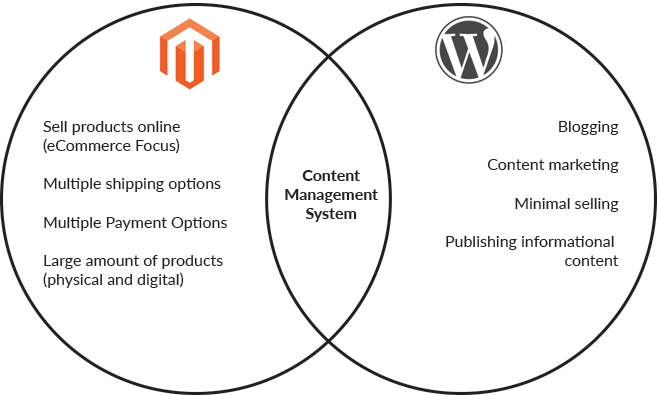
Comparing Magento and WordPress is like comparing apples to oranges. From the outside both platforms may appear similar – they are both highly SEO friendly, easily customizable and have a huge online support community. At the very core of both platforms, you will find that they are both content management systems.Their differences lie in their intended purposes.

Both platforms are great for SEO, have a huge online support community and are easily customizable
If you are just starting a new website for online sales, or already run a content based website and are looking to add some eCommerce features it is easy to find the options daunting – here is what you need to know!
Magento

Magento is an open source eCommerce platform. Magento’s main focus is on features dedicated to facilitating eCommerce. Magento is used by over 250,000 businesses worldwide. From “mom and pop” shops to massive corporations, Magento is able to support a wide range of eCommerce sites.
Magento is functional and customizable – allowing businesses to develop sites to fit a wide range of needs. The primary function of Magento is to build a site for selling numerous products online
WordPress

WordPress is an open source content management system – primarily aimed at blogging and other content driven sites. Over 60 million websites are powered by WordPress. WordPress is considered to be very user friendly, with a huge range of plug-ins and templates.
While you are able to achieve some eCommerce functionality on a WordPress site through plugins (such as the widely popular WooCommerce plug-in), it is very basic.
How Do I Choose?
1) Function of Your Site
If the main function of your website is to sell products online – Magento is going to offer you the most versatility in how you are able to do so. With Magento you can set up a multi-vendor online market place and sell both physical and digital products.
While WordPress can handle some eCommerce functions through plug-ins – such as selling digital products that do not require any complex shipping – if you have a store with over 500 physical items that will need to be shipped then Magento is going to be your best bet. With Magento you will be able to integrate multiple payment and shipping options with ease.
WordPress is all about publishing, and posting informational content online. If your goal is to publish a blog or informational website that sells only a handful of products in a simple way then WordPress might be the best solution for you. If your main goal is content marketing, then you might find Magento to be limited in this aspect.
2) Behind The Scenes
While both platforms are content management systems, you will notice some differences in development.
Magento files are set up across a number of files and folders that share the same name. Where in WordPress all the files are largely contained within the same folder but have a unique naming convention.
Another big different in development is that where Magento is mainly object oriented, WordPress is largely driven through PHP scripting.
WordPress has it’s famed “Widgets” – objects that control the structural elements and design within a template. Magento has both CMS static blocks and widgets – while widgets offer a higher level of overall functionality, the CMS static blocks are used to place text/images on a page or template.
The Verdict
There is no one-size fits all solution. For a website focused on eCommerce – Magento is the more robust system. However if you are planning to focus mainly on content or blogging, then WordPress may be the choice for you. It is also important to note that we have developed websites that incorporate both systems.
Customer Paradigm loves developing for both Magento and WordPress platforms. We can help you make the decision about which solution would be best for your website. Call 303.473.4400 or visit here to have a real person contact you now >>
From our Blog:
Design Rush Partnership
Customer Paradigm is excited to be a part of the Design Rush platform:https://www.designrush.com/agency/profile/customer-paradigm
Sage Intacct: How to Back Date AP and AR invoices via API
How do you back date AR or AP invoices in Sage Intacct? One question that comes up often – how do you back-date an invoice that you are sending into Sage Intacct? Let’s say you have an external system and you’re billing things out today (April 10, 2024) but you want…
Revenue Recognition via API for Sage Intacct Journal Entries
One of the more common questions I’m asked about is how to handle revenue recognition in Sage Intacct. I’m Jeff Finkelstein, founder of Customer Paradigm in Boulder, Colorado. We’ve been doing quite a bit of Sage Intacct integration recently, and I wanted to create a…
How to post AP invoice to Sage Intacct with Foreign Currency
One question that has come up quite a bit in the past is how to best post foreign currency transactions into Sage Intacct for an AP invoice. I’m Jeff Finkelstein, founder of Customer Paradigm in Boulder, Colorado. We’ve been doing quite a bit of Sage Intacct…
How to update existing AP Invoice in Sage Intacct
Wondering how to update an existing AP invoice in Sage Intacct? I’m Jeff Finkelstein, founder of Customer Paradigm in Boulder, Colorado. We’ve been doing quite a bit of Sage Intacct integration recently, and I wanted to create a quick post for how to update an…
Workflow automation tools – are you using the right ones?
Workflow Automation Tools You Should Be Using In today’s fast-paced business landscape, efficiency is paramount. As organizations strive to streamline their operations, workflow automation has emerged as a cornerstone for enhancing productivity and reducing human…
Cloud Computing Trends in 2024: What You Need to Know
Top 5 Biggest Cloud Computing Trends In 2024 As we approach the year 2024, the landscape of cloud computing continues to evolve at a rapid pace. In today’s digital age, organizations are increasingly relying on cloud computing to drive their businesses forward. Forbes…
5 Biggest data integration challenges in 2024 and how to solve them
Data integration can be compared to assembling a large puzzle of information for businesses. It involves working with numerous data, and like puzzle pieces, you need to arrange them correctly to create a complete picture. Data integration is a crucial process that…
Salesforce & Sage Integration – Is manual integration your only option?
Salesforce & Sage Intacct – Is manual integration your only option? Are you tired of manually logging calls and switching between multiple systems to keep track of customer interactions? It might be time to simplify your workflow and elevate your customer service with…
Sage Intaact Integration: Scaling Smarter – Top 5 Pitfalls to avoid
Sage Intacct Integration: Scaling Smarter – Top 5 Pitfalls to avoid Are you ready to supercharge your business operations? In today’s fast-paced business environment, organizations often turn to cloud-based financial management solutions like Sage Intacct to…
What is Celigo? The Definitive Guide to the Leading iPaaS
Exploring Celigo – The Definitive Guide to the Leading iPaaS Discover how Celigo can benefit your business with real life examples. Today, businesses rely heavily on various applications and systems to streamline operations, manage data, and facilitate communication….
Experiencing Celigo Integration Errors? Here’s How To Fix Them
Have errors on your Celigo dashboard? This step-by-step guide will help you pinpoint and resolve errors quickly in integrator.io The Celigo platform includes a range of advanced functionalities designed to help you analyze integration flow runs and manage potential…
Celigo vs. Dell Boomi: A Full Comparison of Leading iPaaS Systems
iPaaS has revolutionized how businesses connect, manage, and automate their applications and data. Among the leading iPaaS providers, Dell Boomi and Celigo stand out for their unique features, market adoption, and customer reviews. In this in-depth comparison, we will…
Breakthrough Growth & Innovation: How Your Business Can Benefit from APIs
In today’s digital landscape, Application Programming Interfaces (APIs) have emerged as powerful tools that can revolutionize how businesses operate and grow. By leveraging APIs, business owners can tap into a vast array of resources, streamline processes, and unlock…
What is an API – Application Programming Interface?
Need help connecting business systems? Want to automate up to 80% of your processes? Then you need an API. APIs are playing an essential role in facilitating communication between IoT (Internet of Things) and AI-driven devices. The traditional request-response…